Overview
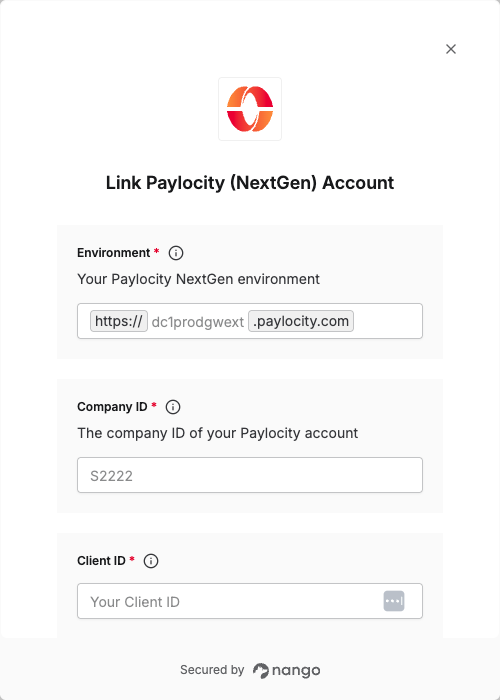
To authenticate with Paylocity, you will need:- Environment - Your Paylocity environment (testing or production).
- Company ID - The unique identifier for your Paylocity company.
- Client ID - A key that is used to identify your Paylocity application.
- Client Secret - A secret key used in conjunction with the Client ID to grant Nango permission to access Paylocity’s API resources and services.
Prerequisites:
- You must have a registered Paylocity account.
Instructions:
Step 1: Select the Correct Paylocity Environment
Paylocity offers two environments for API access. Choose the one that matches your use case:
Note: Use
dc1demogwext for testing and development, and dc1prodgwext for production environments.
Step 2: Find Your Company ID
- Log in to your Paylocity portal.
- Locate your Company ID in the upper left-hand corner of the dashboard.

Step 3: Obtain Your Client Credentials
To get your Client ID and Client Secret, you need to request API access from Paylocity:- Download and fill out the Paylocity Web Services Access Request Form.
- Select all the permissions you want to use for your integration.
- Email your completed form to webservices@paylocity.com.
There may be a cost associated with the API setup & gathering of credentials from Paylocity. Secrets are required to be rotated once every 365 days. An email notification of your secret expiring is sent to the identified contact 10 days and 5 days prior to the expiration.
- Once Paylocity processes your request, you will receive your Client ID and Client Secret.
Step 4: Connect Your Paylocity Account
Once you have your Environment, Company ID, Client ID, and Client Secret:- Open the form where you need to authenticate with Paylocity.
- Enter your Environment (either
dc1demogwextordc1prodgwext). - Enter your Company ID.
- Enter your
NextGenClient ID and Client Secret in their respective fields. - Submit the form, and you should be successfully authenticated.