> ## Documentation Index
> Fetch the complete documentation index at: https://nango.dev/docs/llms.txt
> Use this file to discover all available pages before exploring further.
# Self-host Nango
> Overview of self-hosted deployments.
Nango offers a self-hosted deployment option for Enterprise customers. This guide covers deployment, scaling, updates, and other key operational details.
## Architecture overview
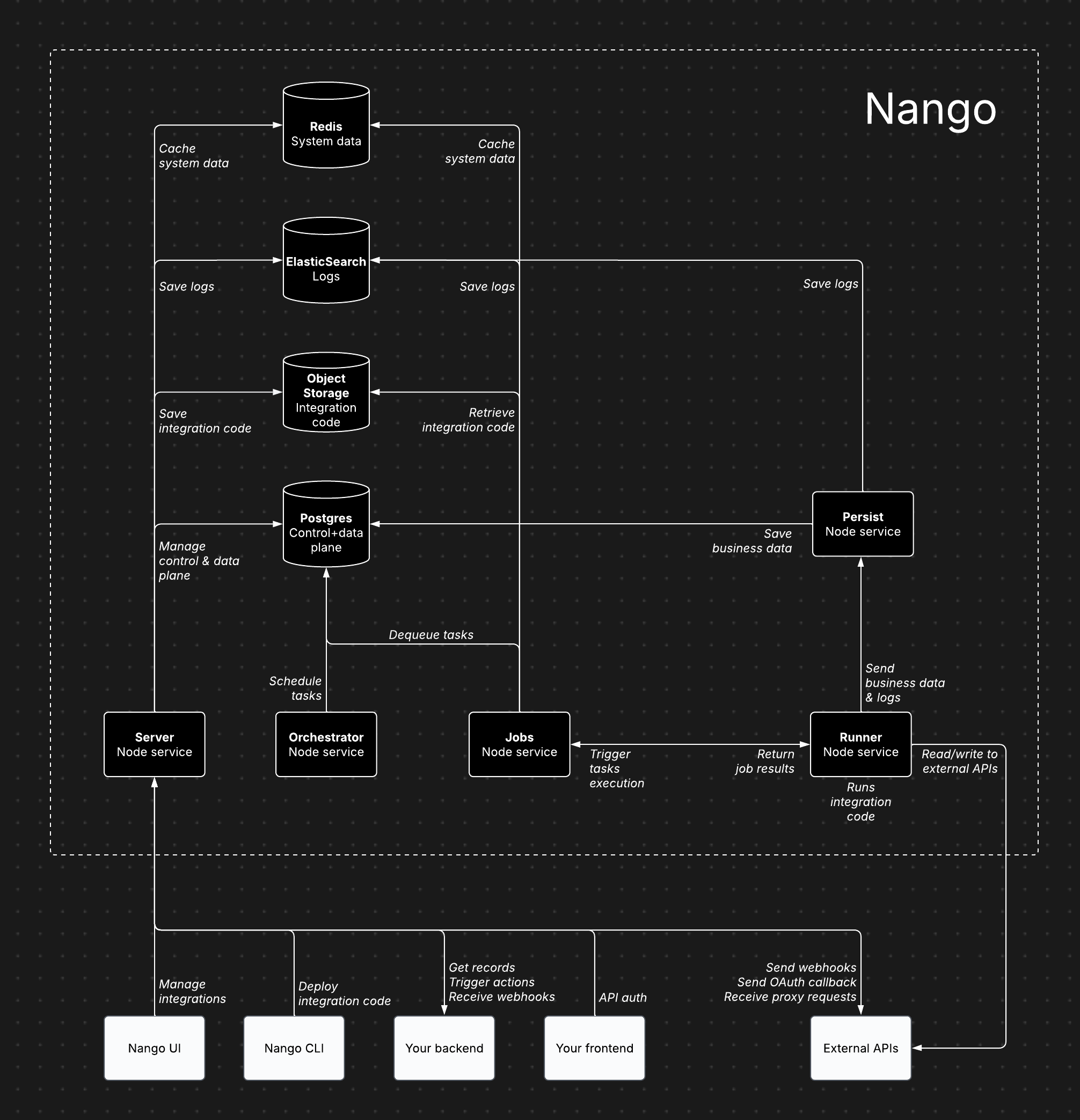 ## Architecture components
Nango consists of several core services, each handling specific responsibilities:
* **Server (Node service)**: Powers the dashboard, API, proxy requests, and incoming/outgoing webhooks.
* **Orchestrator (Node service)**: Manages task scheduling and state tracking.
* **Jobs (Node service)**: Processes tasks and dispatches them to the Runner.
* **Runner (Node service)**: Executes integration code and interacts with external APIs.
* **Persist (Node service)**: Stores synced records and logs.
* **Postgres**: Stores data for the control plane, API credentials, scheduled tasks, and synced records.
* **Object Storage (e.g. S3)**: Stores compiled integration code for execution by the Runner.
* **ElasticSearch**: Stores execution data.
* **Redis**: Caches system data, including socket information, token refresh locks, and rate limits.
## Cloud vs. self-hosted architecture
The Nango architecture is largely the same for both Cloud and Enterprise self-hosting. This ensures self-hosted instances benefit from continuous dogfooding and load testing.
The primary differences are:
* In the Cloud version, the Runner service runs as isolated instances per customer.
* The Postgres database is segmented by use case (control plane, task scheduling, synced records).
## Features
All paid features available on Nango Cloud are also included in the Enterprise self-hosted edition.
## Plan requirement
An [Enterprise plan](https://www.nango.dev/pricing) subscription is required.
Enterprise Self-Hosted pricing contain a fixed annual license and maintenance fee, plus a fraction of the cloud usage-based fees since infrastructure is on the customer side.
## Intended users
Inteded for large and/or regulated enterprises.
## Deployment
By default, Nango is deployed using [Helm charts](https://github.com/NangoHQ/nango-helm-charts). Custom deployments (e.g., ECS) are possible with our guidance.
## Updates
Managed image updates are published on a **two-month cadence**, with occasional **hotfixes** as needed. Notifications about new releases will be posted to your dedicated Nango Slack channel.
You can also subscribe to release notifications on the [`NangoHQ/managed-image-releases`](https://github.com/NangoHQ/managed-image-releases) repository:
* **GitHub:** watch the repository, select **Custom**, and enable **Releases**.
* **RSS/Atom:** subscribe to `https://github.com/NangoHQ/managed-image-releases/releases.atom`, which can be wired into Slack, Microsoft Teams, RSS readers, or internal automation.
Each release includes the managed image tag, application version, source commit hash, release date, Docker pull reference, a GitHub compare link to the previous managed release, and a generated changelog of changes since the previous managed release.
### Image tags
Managed image tags follow this format:
```
nangohq/nango:managed-{managed-release-version}-{application-version}-{commit-sha}
```
* `managed-release-version`: Semantic version for the managed image lifecycle (major = breaking, minor/patch = features/fixes)
* `application-version`: Semantic version of the Nango application baked into the image
* `commit-sha`: Full Git commit hash of the released source
For example, pull a release from Docker Hub with:
```bash theme={null}
docker pull nangohq/nango:managed-1.5.4-0.70.4-0fe07a6d83aea0becc4cea382c5cead2f555718d
```
Customers should **pin their CLI version to the `application-version`** specified in the tag for compatibility.
### Versions and policy
You can find the latest version in [`managed-manifest.json`](https://github.com/NangoHQ/managed-image-releases/blob/main/managed-manifest.json) on `managed-image-releases` (mirrored from [`NangoHQ/nango`](https://github.com/NangoHQ/nango/blob/master/managed-manifest.json) on each release). The in-repo [`CHANGELOG.md`](https://github.com/NangoHQ/managed-image-releases/blob/main/CHANGELOG.md) tracks release history.
Each managed release maps to a specific source commit, and published image tags are never changed after release. Customers are encouraged to stay reasonably current with managed image releases.
See the full [changelog](/updates/changelog) for details on each release.
## Cloud provider support
Supports all major cloud providers (AWS, GCP, Azure).
## Recommended configuration
* **5 Node services** (Server, Persist, Runner, Jobs, Orchestrator): 1 CPU, 2GB RAM per service
* **Postgres database**: 2 CPU, 8GB RAM, 128GB storage
* **Redis data store**: 128MB
* **ElasticSearch data store**: 2 vCPU, 1GB RAM, 30GB storage
* **Object storage (e.g. S3)**: less than 500MB of storage
## Scaling
The default configuration supports 1M+ sync/action executions per day (assuming \~2s execution time per action/sync).
Auto-scaling is not provided out-of-the-box yet, but the default configuration scales far. We can guide you on configuring auto-scaling when needed.
Bottlenecks mostly depend on:
* **Action/sync execution time**: solved by scaling the Runner service vertically, then horizontally.
* **Cached records & size (for sync functions only)**: solved by scaling Postgres vertically.
## Data storage
* **Postgres**: Stores data for the control plane, API credentials, scheduled tasks, and synced records.
* **Object Storage (e.g. S3)**: Stores compiled integration code for execution by the Runner.
* **ElasticSearch**: Stores execution data.
* **Redis**: Caches system data, including socket information, token refresh locks, and rate limits.
## Using existing data stores
Yes, Nango is flexible with data store setups. However, we recommend a separate instance for independent scaling.
## Internet access requirements
* **Server:** Required for proxy requests, credential management, and incoming/outgoing webhooks (inbound & outbound traffic).
* **Runner:** Required for reading/writing data from external APIs during sync and action executions (outbound traffic only).
## Exporting metrics & logs
Yes, metrics and logs can be exported to any monitoring tool using our OpenTelemetry Export add-on. Additional metrics and logs can be added upon request.
## Email service
Nango uses emails for account verification, password reset, and sending invitations, etc...
Any SMTP server can be configured to be used by Nango for these email communications.
## Encryption key
You must provide your own encryption key via the `NANGO_ENCRYPTION_KEY` environment variable to enable encryption at rest. It encrypts credentials in the control-plane database as well as data in the records cache. Without this key, credentials are stored unencrypted.
The records cache always requires this key. If you run sync functions that persist records, the persist and records services fail to store or retrieve records when `NANGO_ENCRYPTION_KEY` is not set—they do not fall back to plaintext.
The encryption key must be a base64-encoded 256-bit (32-byte) key. Key rotation is not supported yet—changing the key after initial setup will cause decryption failures. Plan your key management accordingly.
## Data retention configuration
The default retention period for deleted connections is 31 days. You can configure this via the `CRON_DELETE_OLD_CONNECTIONS_MAX_DAYS` environment variable.
## Free self-hosting
A limited free self-hosting option is available for hobby projects. It is intended for lightweight deployments that need Auth and Proxy, without the managed features and support included with Enterprise self-hosting or Nango Cloud.
For more details, see the [pricing page](https://nango.dev/pricing) or [schedule a call](https://nango.dev/demo) to discuss the Enterprise self-hosted version.
### Feature availability
| Feature | Free self-hosted | Enterprise self-hosted / Nango Cloud |
| ----------------------- | ----------------- | ------------------------------------ |
| Auth | Yes | Yes |
| Proxy | Yes | Yes |
| Observability | Auth + proxy only | Full |
| OpenTelemetry export | No | Yes |
| Functions | No | Yes |
| Webhooks | No | Yes |
| MCP server | No | Yes |
| Customize auth branding | No | Yes |
| Role-based permissions | No | Yes |
| SAML SSO | No | On the roadmap |
| Support SLA | No | Yes |
### Server URL, callback URL, and custom domains
Add server environment variables for the instance URL and port in the `.env` file or directly in your hosting provider:
```sh theme={null}
NANGO_SERVER_URL=
SERVER_PORT=
```
The resulting OAuth callback URL is `/oauth/callback`.
You can customize the callback URL by updating the "Callback URL" field in the "Environment Settings" tab in the Nango admin.
If you are using a custom domain, update `NANGO_SERVER_URL` to match it.
### Connect UI
Nango Connect is available for self-hosted deployments in the main Docker image.
```sh theme={null}
FLAG_SERVE_CONNECT_UI=true
NANGO_CONNECT_UI_PORT=3009
NANGO_PUBLIC_CONNECT_URL=
```
Nango Connect is available by default at `http://localhost:3009`.
If you are using a custom domain, update `NANGO_PUBLIC_CONNECT_URL` to match it.
See [Auth](/guides/auth/auth-guide) for the end-user connection flow.
### Persistent storage
If you deploy with Docker Compose, the bundled database uses local container storage. This is not appropriate for production.
Connect Nango to an external Postgres database by setting the database environment variables:
```sh theme={null}
NANGO_DB_USER=
NANGO_DB_PASSWORD=
NANGO_DB_HOST=
NANGO_DB_PORT=
NANGO_DB_NAME=
NANGO_DB_SSL=true
```
You can also use a database URL:
```sh theme={null}
NANGO_DATABASE_URL=postgresql://user:password@host:port/dbname
```
Special characters in `NANGO_DATABASE_URL` must be URL encoded.
Nango is incompatible with connection poolers using `pool_mode=transaction`. Use a direct database connection or configure the pooler to use a different mode.
Records saved by sync functions can be persisted in a dedicated database. To use a dedicated records database, set `RECORDS_DATABASE_URL`:
```sh theme={null}
RECORDS_DATABASE_URL=postgresql://user:password@host:port/dbname
```
Special characters in `RECORDS_DATABASE_URL` must be URL encoded. If it is not specified, records are stored in the main database.
Deploying with Render or Heroku automatically generates a persistent database connected to your Nango instance.
### External Redis
The bundled Redis is fine for local use but not for production. Connect Nango to an external Redis (or Valkey) with either a full URL or discrete variables:
```sh theme={null}
NANGO_REDIS_URL=rediss://:@:
# or
NANGO_REDIS_HOST=
NANGO_REDIS_PORT=
NANGO_REDIS_AUTH=
```
Use the `rediss://` scheme (or discrete variables, which default to TLS) to enable in-transit encryption.
#### IAM / short-lived token authentication
Managed Redis with IAM authentication (for example GCP Memorystore for Valkey) uses a short-lived token as the password and requires the token to be refreshed before it expires. Instead of a static `NANGO_REDIS_AUTH`, point Nango at a file that an external process (such as a sidecar) keeps up to date:
```sh theme={null}
NANGO_REDIS_HOST=
NANGO_REDIS_PORT=
NANGO_REDIS_AUTH_TOKEN_FILE=/path/to/token # re-read on every (re)connect
NANGO_REDIS_USERNAME= # optional; defaults to "default"
```
Nango reads the token file on every connection and reconnection, so a rotated token is always picked up without a restart. This is cloud-agnostic: anything that writes the current token to the file works. The writer must update the file atomically — write a temporary file and `rename()` it into place — so a reconnect never reads a half-written token and fails authentication. When `NANGO_REDIS_AUTH_TOKEN_FILE` is set, do not embed credentials in `NANGO_REDIS_URL`.
The runner boundary has the same set of variables prefixed with `NANGO_CUSTOMER_REDIS_` (for example `NANGO_CUSTOMER_REDIS_AUTH_TOKEN_FILE`); it falls back to the system Redis when unset.
### Securing your instance
#### Proxy base URL override hardening
The [proxy](/guides/platform/proxy-requests) can send authenticated requests to external APIs. Some proxy calls accept a **base URL override** (HTTP header `Base-Url-Override`, SDK `baseUrlOverride`, or an integration `custom.baseUrl`) to target a host that differs from the provider's default API base URL.
Because the proxy makes outbound HTTP requests from your Nango server (and from the runner for sync and action scripts), a caller with permission to use the proxy could use an override to reach hosts that were not meant to be exposed—such as cloud metadata services or `localhost` on the host making the request. This is a classic **SSRF** risk.
By default, Nango keeps base URL override **enabled** and blocks override targets and redirect hops whose hostnames match a built-in denylist (cloud metadata and loopback addresses). Configure these environment variables and restart the **server** and **runners** after changes:
```sh theme={null}
NANGO_PROXY_BASE_URL_OVERRIDE_ENABLED=true
NANGO_PROXY_BASE_URL_OVERRIDE_DENYLIST='["169.254.169.254","metadata.google.internal","localhost","127.0.0.1","[::1]"]'
```
| Variable | Default | Purpose |
| ---------------------------------------- | -------------------------- | --------------------------------------------------------------------------------------------- |
| `NANGO_PROXY_BASE_URL_OVERRIDE_ENABLED` | `true` | Set to `false` to reject all base URL overrides |
| `NANGO_PROXY_BASE_URL_OVERRIDE_DENYLIST` | Secure defaults when unset | JSON array of hostnames or URLs to block; custom entries are merged with defaults |
| `NANGO_OUTBOUND_URL_POLICY` | Secure defaults when unset | JSON object controlling SSRF protection for proxy, customer webhooks, and `uncontrolledFetch` |
**Operator guidance:**
* **Production:** keep the default denylist. Add environment-specific hosts if your deployment exposes additional internal endpoints.
* **Legitimate localhost overrides (dev only):** set `NANGO_PROXY_BASE_URL_OVERRIDE_DENYLIST='[]'` to restore fail-open behavior.
* **No overrides at all:** set `NANGO_PROXY_BASE_URL_OVERRIDE_ENABLED=false`.
Denylist matching is hostname-based and applies to redirect hops as well as the initial override target.
#### Outbound URL policy (DNS rebinding, private IPs, redirects)
Beyond the hostname denylist, Nango routes every outbound connection on the **proxy**, **customer webhook delivery**, and **`uncontrolledFetch`** paths through DNS-pinning agents that re-validate the *resolved* IP address — closing DNS-rebinding and redirect-to-internal-address SSRF holes. The behavior is controlled by `NANGO_OUTBOUND_URL_POLICY`, a JSON object (applied on top of the denylist). It propagates automatically to runners.
The `mode` field selects how hostnames are filtered:
* **`denylist`** (default): every destination is reachable except hostnames on the denylist (plus the IP-based protections below). This is the out-of-the-box mode, since the denylist always carries the secure defaults.
* **`allowlist`**: only hostnames in `allowlist` are reachable (a leading `.` matches subdomains); everything else is rejected. The denylist and the IP-based protections still apply on top, so allowlist is strictly *more* restrictive — a listed hostname that resolves to a blocked IP is still rejected.
* **`permissive`**: no hostname-based filtering (the IP-based protections below still apply). You only reach this mode deliberately — either by emptying the server denylist with no explicit mode (see below), or by setting `mode: "permissive"`.
The IP-based protections apply in **every** mode, including `permissive`. Loopback (`127.0.0.0/8`, `::1`) and unspecified addresses are **always** blocked; private/RFC1918/CGNAT addresses (`blockPrivateIps`) and link-local addresses — including the cloud-metadata IP `169.254.169.254` (`blockLinkLocal`) — are blocked by default.
The denylist is **never empty by default** — it is always seeded with the secure defaults (`localhost`, `metadata.google.internal`, `169.254.169.254`, …). It only becomes empty if you explicitly opt out: either `NANGO_PROXY_BASE_URL_OVERRIDE_DENYLIST='[]'` (server only, which then selects `permissive`) or `mode: "permissive"`. Even then, only hostname string matches such as `localhost` are dropped — literal or resolved internal IPs stay blocked unless you also set `blockPrivateIps`/`blockLinkLocal` to `false`. Runners re-apply the secure denylist defaults even when the server has emptied its denylist; note an explicit `mode: "permissive"` empties the denylist everywhere, runners included.
```sh theme={null}
# Block private/link-local IPs (default) and cap redirects at 3
NANGO_OUTBOUND_URL_POLICY='{"blockPrivateIps":true,"blockLinkLocal":true,"maxRedirects":3}'
# Allowlist mode: only the listed hostnames (and their subdomains) are reachable
NANGO_OUTBOUND_URL_POLICY='{"mode":"allowlist","allowlist":[".hubspot.com","api.github.com"]}'
```
| Field | Default | Purpose |
| ----------------- | ------------------------------------------------------------- | ------------------------------------------------------------------------------------- |
| `mode` | `denylist` (auto-`permissive` only if you empty the denylist) | `denylist`, `allowlist`, or `permissive` (see above) |
| `allowlist` | `[]` | In `allowlist` mode, hostnames (a leading `.` matches subdomains) that may be reached |
| `blockPrivateIps` | `true` | Block RFC1918 / CGNAT addresses (all modes) |
| `blockLinkLocal` | `true` | Block link-local addresses incl. `169.254.169.254` (all modes) |
| `maxRedirects` | `5` | Maximum redirect hops followed |
Each resolved address (including on every redirect hop) is validated; in `allowlist` mode, only listed hostnames are reachable regardless of IP.
#### Securing the dashboard
By default, the dashboard of your Nango instance is open to anyone who can access your instance URL.
You can secure it with Basic Auth by setting the following environment variables and restarting the server:
```bash theme={null}
FLAG_AUTH_ENABLED=false
NANGO_DASHBOARD_USERNAME=
NANGO_DASHBOARD_PASSWORD=
```
#### Encrypting sensitive data
You can enforce encryption of sensitive data, including tokens, secret keys, and app secrets, by setting a 256-bit base64-encoded key:
```sh theme={null}
openssl rand -base64 32
```
Set the generated value as `NANGO_ENCRYPTION_KEY`:
```sh theme={null}
NANGO_ENCRYPTION_KEY=
```
After you restart the Nango server, database encryption happens automatically. The encryption key cannot currently be modified after it is set.
`NANGO_ENCRYPTION_KEY` is also required for Connect UI. It is used to generate sessions for [Connect UI](/reference/frontend/frontend-sdk#connect-using-nango-connect-ui). Without this key, Connect UI will not work.
#### Custom websockets path
The Nango server serves websockets from `/` by default for use by `@nangohq/frontend` during the login flow.
To isolate websockets from the dashboard, set `NANGO_SERVER_WEBSOCKETS_PATH`:
```sh theme={null}
NANGO_SERVER_WEBSOCKETS_PATH=
```
If you set a custom path, configure `websocketsPath` when initializing the `Nango` object in the `@nangohq/frontend` SDK:
```js theme={null}
import Nango from '@nangohq/frontend';
let nango = new Nango({ host: 'https://', websocketsPath: '' });
```
### Telemetry
Self-hosted instances do not automatically send telemetry back to Nango. Operational metrics and logs stay within your own infrastructure and are only exported if you configure the OpenTelemetry Export add-on described above.
### Logs
Nango stores execution logs and powers the logs UI with either Elasticsearch or OpenSearch. To keep free self-hosted deployments lighter, this stack is optional.
To enable logs:
* Host an Elasticsearch or OpenSearch cluster.
* Set `NANGO_LOGS_ENABLED=true`.
* Configure the relevant `NANGO_LOGS_ES_*` environment variables (these apply to both providers).
Nango uses Elasticsearch by default. To use OpenSearch instead, set:
```sh theme={null}
NANGO_LOGS_PROVIDER=opensearch
```
Elasticsearch hosting options include:
* Local: uncomment the service in [`docker-compose.yaml`](https://github.com/NangoHQ/nango/blob/master/docker-compose.yaml#L63) and run `docker-compose up`.
* Elastic Cloud: use [elastic.co](https://www.elastic.co/).
* Render: deploy an Elasticsearch instance with [Render](https://docs.render.com/deploy-elasticsearch).
If `NANGO_LOGS_ENABLED` is `false`, logs are sent to stdout and can be viewed in your host logs.
### Run and update Nango
To install Nango on a VM:
```bash theme={null}
mkdir nango && cd nango
wget https://raw.githubusercontent.com/NangoHQ/nango/master/docker-compose.yaml
docker-compose up -d
```
To update Nango:
```bash theme={null}
docker-compose stop
docker-compose rm -f
docker-compose pull
docker-compose up -d
```
If you are interested in the Enterprise self-hosting version, please get in touch with us in the [community](https://nango.dev/slack) or [book a demo](https://nango.dev/demo).
## Related guides
* [Security](/guides/platform/security) - review data, encryption, and access controls.
* [Environments](/guides/platform/environments) - organize dev, staging, and production setups.
* [Changelog](/updates/changelog) - track changes that affect self-hosted upgrades.
## Architecture components
Nango consists of several core services, each handling specific responsibilities:
* **Server (Node service)**: Powers the dashboard, API, proxy requests, and incoming/outgoing webhooks.
* **Orchestrator (Node service)**: Manages task scheduling and state tracking.
* **Jobs (Node service)**: Processes tasks and dispatches them to the Runner.
* **Runner (Node service)**: Executes integration code and interacts with external APIs.
* **Persist (Node service)**: Stores synced records and logs.
* **Postgres**: Stores data for the control plane, API credentials, scheduled tasks, and synced records.
* **Object Storage (e.g. S3)**: Stores compiled integration code for execution by the Runner.
* **ElasticSearch**: Stores execution data.
* **Redis**: Caches system data, including socket information, token refresh locks, and rate limits.
## Cloud vs. self-hosted architecture
The Nango architecture is largely the same for both Cloud and Enterprise self-hosting. This ensures self-hosted instances benefit from continuous dogfooding and load testing.
The primary differences are:
* In the Cloud version, the Runner service runs as isolated instances per customer.
* The Postgres database is segmented by use case (control plane, task scheduling, synced records).
## Features
All paid features available on Nango Cloud are also included in the Enterprise self-hosted edition.
## Plan requirement
An [Enterprise plan](https://www.nango.dev/pricing) subscription is required.
Enterprise Self-Hosted pricing contain a fixed annual license and maintenance fee, plus a fraction of the cloud usage-based fees since infrastructure is on the customer side.
## Intended users
Inteded for large and/or regulated enterprises.
## Deployment
By default, Nango is deployed using [Helm charts](https://github.com/NangoHQ/nango-helm-charts). Custom deployments (e.g., ECS) are possible with our guidance.
## Updates
Managed image updates are published on a **two-month cadence**, with occasional **hotfixes** as needed. Notifications about new releases will be posted to your dedicated Nango Slack channel.
You can also subscribe to release notifications on the [`NangoHQ/managed-image-releases`](https://github.com/NangoHQ/managed-image-releases) repository:
* **GitHub:** watch the repository, select **Custom**, and enable **Releases**.
* **RSS/Atom:** subscribe to `https://github.com/NangoHQ/managed-image-releases/releases.atom`, which can be wired into Slack, Microsoft Teams, RSS readers, or internal automation.
Each release includes the managed image tag, application version, source commit hash, release date, Docker pull reference, a GitHub compare link to the previous managed release, and a generated changelog of changes since the previous managed release.
### Image tags
Managed image tags follow this format:
```
nangohq/nango:managed-{managed-release-version}-{application-version}-{commit-sha}
```
* `managed-release-version`: Semantic version for the managed image lifecycle (major = breaking, minor/patch = features/fixes)
* `application-version`: Semantic version of the Nango application baked into the image
* `commit-sha`: Full Git commit hash of the released source
For example, pull a release from Docker Hub with:
```bash theme={null}
docker pull nangohq/nango:managed-1.5.4-0.70.4-0fe07a6d83aea0becc4cea382c5cead2f555718d
```
Customers should **pin their CLI version to the `application-version`** specified in the tag for compatibility.
### Versions and policy
You can find the latest version in [`managed-manifest.json`](https://github.com/NangoHQ/managed-image-releases/blob/main/managed-manifest.json) on `managed-image-releases` (mirrored from [`NangoHQ/nango`](https://github.com/NangoHQ/nango/blob/master/managed-manifest.json) on each release). The in-repo [`CHANGELOG.md`](https://github.com/NangoHQ/managed-image-releases/blob/main/CHANGELOG.md) tracks release history.
Each managed release maps to a specific source commit, and published image tags are never changed after release. Customers are encouraged to stay reasonably current with managed image releases.
See the full [changelog](/updates/changelog) for details on each release.
## Cloud provider support
Supports all major cloud providers (AWS, GCP, Azure).
## Recommended configuration
* **5 Node services** (Server, Persist, Runner, Jobs, Orchestrator): 1 CPU, 2GB RAM per service
* **Postgres database**: 2 CPU, 8GB RAM, 128GB storage
* **Redis data store**: 128MB
* **ElasticSearch data store**: 2 vCPU, 1GB RAM, 30GB storage
* **Object storage (e.g. S3)**: less than 500MB of storage
## Scaling
The default configuration supports 1M+ sync/action executions per day (assuming \~2s execution time per action/sync).
Auto-scaling is not provided out-of-the-box yet, but the default configuration scales far. We can guide you on configuring auto-scaling when needed.
Bottlenecks mostly depend on:
* **Action/sync execution time**: solved by scaling the Runner service vertically, then horizontally.
* **Cached records & size (for sync functions only)**: solved by scaling Postgres vertically.
## Data storage
* **Postgres**: Stores data for the control plane, API credentials, scheduled tasks, and synced records.
* **Object Storage (e.g. S3)**: Stores compiled integration code for execution by the Runner.
* **ElasticSearch**: Stores execution data.
* **Redis**: Caches system data, including socket information, token refresh locks, and rate limits.
## Using existing data stores
Yes, Nango is flexible with data store setups. However, we recommend a separate instance for independent scaling.
## Internet access requirements
* **Server:** Required for proxy requests, credential management, and incoming/outgoing webhooks (inbound & outbound traffic).
* **Runner:** Required for reading/writing data from external APIs during sync and action executions (outbound traffic only).
## Exporting metrics & logs
Yes, metrics and logs can be exported to any monitoring tool using our OpenTelemetry Export add-on. Additional metrics and logs can be added upon request.
## Email service
Nango uses emails for account verification, password reset, and sending invitations, etc...
Any SMTP server can be configured to be used by Nango for these email communications.
## Encryption key
You must provide your own encryption key via the `NANGO_ENCRYPTION_KEY` environment variable to enable encryption at rest. It encrypts credentials in the control-plane database as well as data in the records cache. Without this key, credentials are stored unencrypted.
The records cache always requires this key. If you run sync functions that persist records, the persist and records services fail to store or retrieve records when `NANGO_ENCRYPTION_KEY` is not set—they do not fall back to plaintext.
The encryption key must be a base64-encoded 256-bit (32-byte) key. Key rotation is not supported yet—changing the key after initial setup will cause decryption failures. Plan your key management accordingly.
## Data retention configuration
The default retention period for deleted connections is 31 days. You can configure this via the `CRON_DELETE_OLD_CONNECTIONS_MAX_DAYS` environment variable.
## Free self-hosting
A limited free self-hosting option is available for hobby projects. It is intended for lightweight deployments that need Auth and Proxy, without the managed features and support included with Enterprise self-hosting or Nango Cloud.
For more details, see the [pricing page](https://nango.dev/pricing) or [schedule a call](https://nango.dev/demo) to discuss the Enterprise self-hosted version.
### Feature availability
| Feature | Free self-hosted | Enterprise self-hosted / Nango Cloud |
| ----------------------- | ----------------- | ------------------------------------ |
| Auth | Yes | Yes |
| Proxy | Yes | Yes |
| Observability | Auth + proxy only | Full |
| OpenTelemetry export | No | Yes |
| Functions | No | Yes |
| Webhooks | No | Yes |
| MCP server | No | Yes |
| Customize auth branding | No | Yes |
| Role-based permissions | No | Yes |
| SAML SSO | No | On the roadmap |
| Support SLA | No | Yes |
### Server URL, callback URL, and custom domains
Add server environment variables for the instance URL and port in the `.env` file or directly in your hosting provider:
```sh theme={null}
NANGO_SERVER_URL=
SERVER_PORT=
```
The resulting OAuth callback URL is `/oauth/callback`.
You can customize the callback URL by updating the "Callback URL" field in the "Environment Settings" tab in the Nango admin.
If you are using a custom domain, update `NANGO_SERVER_URL` to match it.
### Connect UI
Nango Connect is available for self-hosted deployments in the main Docker image.
```sh theme={null}
FLAG_SERVE_CONNECT_UI=true
NANGO_CONNECT_UI_PORT=3009
NANGO_PUBLIC_CONNECT_URL=
```
Nango Connect is available by default at `http://localhost:3009`.
If you are using a custom domain, update `NANGO_PUBLIC_CONNECT_URL` to match it.
See [Auth](/guides/auth/auth-guide) for the end-user connection flow.
### Persistent storage
If you deploy with Docker Compose, the bundled database uses local container storage. This is not appropriate for production.
Connect Nango to an external Postgres database by setting the database environment variables:
```sh theme={null}
NANGO_DB_USER=
NANGO_DB_PASSWORD=
NANGO_DB_HOST=
NANGO_DB_PORT=
NANGO_DB_NAME=
NANGO_DB_SSL=true
```
You can also use a database URL:
```sh theme={null}
NANGO_DATABASE_URL=postgresql://user:password@host:port/dbname
```
Special characters in `NANGO_DATABASE_URL` must be URL encoded.
Nango is incompatible with connection poolers using `pool_mode=transaction`. Use a direct database connection or configure the pooler to use a different mode.
Records saved by sync functions can be persisted in a dedicated database. To use a dedicated records database, set `RECORDS_DATABASE_URL`:
```sh theme={null}
RECORDS_DATABASE_URL=postgresql://user:password@host:port/dbname
```
Special characters in `RECORDS_DATABASE_URL` must be URL encoded. If it is not specified, records are stored in the main database.
Deploying with Render or Heroku automatically generates a persistent database connected to your Nango instance.
### External Redis
The bundled Redis is fine for local use but not for production. Connect Nango to an external Redis (or Valkey) with either a full URL or discrete variables:
```sh theme={null}
NANGO_REDIS_URL=rediss://:@:
# or
NANGO_REDIS_HOST=
NANGO_REDIS_PORT=
NANGO_REDIS_AUTH=
```
Use the `rediss://` scheme (or discrete variables, which default to TLS) to enable in-transit encryption.
#### IAM / short-lived token authentication
Managed Redis with IAM authentication (for example GCP Memorystore for Valkey) uses a short-lived token as the password and requires the token to be refreshed before it expires. Instead of a static `NANGO_REDIS_AUTH`, point Nango at a file that an external process (such as a sidecar) keeps up to date:
```sh theme={null}
NANGO_REDIS_HOST=
NANGO_REDIS_PORT=
NANGO_REDIS_AUTH_TOKEN_FILE=/path/to/token # re-read on every (re)connect
NANGO_REDIS_USERNAME= # optional; defaults to "default"
```
Nango reads the token file on every connection and reconnection, so a rotated token is always picked up without a restart. This is cloud-agnostic: anything that writes the current token to the file works. The writer must update the file atomically — write a temporary file and `rename()` it into place — so a reconnect never reads a half-written token and fails authentication. When `NANGO_REDIS_AUTH_TOKEN_FILE` is set, do not embed credentials in `NANGO_REDIS_URL`.
The runner boundary has the same set of variables prefixed with `NANGO_CUSTOMER_REDIS_` (for example `NANGO_CUSTOMER_REDIS_AUTH_TOKEN_FILE`); it falls back to the system Redis when unset.
### Securing your instance
#### Proxy base URL override hardening
The [proxy](/guides/platform/proxy-requests) can send authenticated requests to external APIs. Some proxy calls accept a **base URL override** (HTTP header `Base-Url-Override`, SDK `baseUrlOverride`, or an integration `custom.baseUrl`) to target a host that differs from the provider's default API base URL.
Because the proxy makes outbound HTTP requests from your Nango server (and from the runner for sync and action scripts), a caller with permission to use the proxy could use an override to reach hosts that were not meant to be exposed—such as cloud metadata services or `localhost` on the host making the request. This is a classic **SSRF** risk.
By default, Nango keeps base URL override **enabled** and blocks override targets and redirect hops whose hostnames match a built-in denylist (cloud metadata and loopback addresses). Configure these environment variables and restart the **server** and **runners** after changes:
```sh theme={null}
NANGO_PROXY_BASE_URL_OVERRIDE_ENABLED=true
NANGO_PROXY_BASE_URL_OVERRIDE_DENYLIST='["169.254.169.254","metadata.google.internal","localhost","127.0.0.1","[::1]"]'
```
| Variable | Default | Purpose |
| ---------------------------------------- | -------------------------- | --------------------------------------------------------------------------------------------- |
| `NANGO_PROXY_BASE_URL_OVERRIDE_ENABLED` | `true` | Set to `false` to reject all base URL overrides |
| `NANGO_PROXY_BASE_URL_OVERRIDE_DENYLIST` | Secure defaults when unset | JSON array of hostnames or URLs to block; custom entries are merged with defaults |
| `NANGO_OUTBOUND_URL_POLICY` | Secure defaults when unset | JSON object controlling SSRF protection for proxy, customer webhooks, and `uncontrolledFetch` |
**Operator guidance:**
* **Production:** keep the default denylist. Add environment-specific hosts if your deployment exposes additional internal endpoints.
* **Legitimate localhost overrides (dev only):** set `NANGO_PROXY_BASE_URL_OVERRIDE_DENYLIST='[]'` to restore fail-open behavior.
* **No overrides at all:** set `NANGO_PROXY_BASE_URL_OVERRIDE_ENABLED=false`.
Denylist matching is hostname-based and applies to redirect hops as well as the initial override target.
#### Outbound URL policy (DNS rebinding, private IPs, redirects)
Beyond the hostname denylist, Nango routes every outbound connection on the **proxy**, **customer webhook delivery**, and **`uncontrolledFetch`** paths through DNS-pinning agents that re-validate the *resolved* IP address — closing DNS-rebinding and redirect-to-internal-address SSRF holes. The behavior is controlled by `NANGO_OUTBOUND_URL_POLICY`, a JSON object (applied on top of the denylist). It propagates automatically to runners.
The `mode` field selects how hostnames are filtered:
* **`denylist`** (default): every destination is reachable except hostnames on the denylist (plus the IP-based protections below). This is the out-of-the-box mode, since the denylist always carries the secure defaults.
* **`allowlist`**: only hostnames in `allowlist` are reachable (a leading `.` matches subdomains); everything else is rejected. The denylist and the IP-based protections still apply on top, so allowlist is strictly *more* restrictive — a listed hostname that resolves to a blocked IP is still rejected.
* **`permissive`**: no hostname-based filtering (the IP-based protections below still apply). You only reach this mode deliberately — either by emptying the server denylist with no explicit mode (see below), or by setting `mode: "permissive"`.
The IP-based protections apply in **every** mode, including `permissive`. Loopback (`127.0.0.0/8`, `::1`) and unspecified addresses are **always** blocked; private/RFC1918/CGNAT addresses (`blockPrivateIps`) and link-local addresses — including the cloud-metadata IP `169.254.169.254` (`blockLinkLocal`) — are blocked by default.
The denylist is **never empty by default** — it is always seeded with the secure defaults (`localhost`, `metadata.google.internal`, `169.254.169.254`, …). It only becomes empty if you explicitly opt out: either `NANGO_PROXY_BASE_URL_OVERRIDE_DENYLIST='[]'` (server only, which then selects `permissive`) or `mode: "permissive"`. Even then, only hostname string matches such as `localhost` are dropped — literal or resolved internal IPs stay blocked unless you also set `blockPrivateIps`/`blockLinkLocal` to `false`. Runners re-apply the secure denylist defaults even when the server has emptied its denylist; note an explicit `mode: "permissive"` empties the denylist everywhere, runners included.
```sh theme={null}
# Block private/link-local IPs (default) and cap redirects at 3
NANGO_OUTBOUND_URL_POLICY='{"blockPrivateIps":true,"blockLinkLocal":true,"maxRedirects":3}'
# Allowlist mode: only the listed hostnames (and their subdomains) are reachable
NANGO_OUTBOUND_URL_POLICY='{"mode":"allowlist","allowlist":[".hubspot.com","api.github.com"]}'
```
| Field | Default | Purpose |
| ----------------- | ------------------------------------------------------------- | ------------------------------------------------------------------------------------- |
| `mode` | `denylist` (auto-`permissive` only if you empty the denylist) | `denylist`, `allowlist`, or `permissive` (see above) |
| `allowlist` | `[]` | In `allowlist` mode, hostnames (a leading `.` matches subdomains) that may be reached |
| `blockPrivateIps` | `true` | Block RFC1918 / CGNAT addresses (all modes) |
| `blockLinkLocal` | `true` | Block link-local addresses incl. `169.254.169.254` (all modes) |
| `maxRedirects` | `5` | Maximum redirect hops followed |
Each resolved address (including on every redirect hop) is validated; in `allowlist` mode, only listed hostnames are reachable regardless of IP.
#### Securing the dashboard
By default, the dashboard of your Nango instance is open to anyone who can access your instance URL.
You can secure it with Basic Auth by setting the following environment variables and restarting the server:
```bash theme={null}
FLAG_AUTH_ENABLED=false
NANGO_DASHBOARD_USERNAME=
NANGO_DASHBOARD_PASSWORD=
```
#### Encrypting sensitive data
You can enforce encryption of sensitive data, including tokens, secret keys, and app secrets, by setting a 256-bit base64-encoded key:
```sh theme={null}
openssl rand -base64 32
```
Set the generated value as `NANGO_ENCRYPTION_KEY`:
```sh theme={null}
NANGO_ENCRYPTION_KEY=
```
After you restart the Nango server, database encryption happens automatically. The encryption key cannot currently be modified after it is set.
`NANGO_ENCRYPTION_KEY` is also required for Connect UI. It is used to generate sessions for [Connect UI](/reference/frontend/frontend-sdk#connect-using-nango-connect-ui). Without this key, Connect UI will not work.
#### Custom websockets path
The Nango server serves websockets from `/` by default for use by `@nangohq/frontend` during the login flow.
To isolate websockets from the dashboard, set `NANGO_SERVER_WEBSOCKETS_PATH`:
```sh theme={null}
NANGO_SERVER_WEBSOCKETS_PATH=
```
If you set a custom path, configure `websocketsPath` when initializing the `Nango` object in the `@nangohq/frontend` SDK:
```js theme={null}
import Nango from '@nangohq/frontend';
let nango = new Nango({ host: 'https://', websocketsPath: '' });
```
### Telemetry
Self-hosted instances do not automatically send telemetry back to Nango. Operational metrics and logs stay within your own infrastructure and are only exported if you configure the OpenTelemetry Export add-on described above.
### Logs
Nango stores execution logs and powers the logs UI with either Elasticsearch or OpenSearch. To keep free self-hosted deployments lighter, this stack is optional.
To enable logs:
* Host an Elasticsearch or OpenSearch cluster.
* Set `NANGO_LOGS_ENABLED=true`.
* Configure the relevant `NANGO_LOGS_ES_*` environment variables (these apply to both providers).
Nango uses Elasticsearch by default. To use OpenSearch instead, set:
```sh theme={null}
NANGO_LOGS_PROVIDER=opensearch
```
Elasticsearch hosting options include:
* Local: uncomment the service in [`docker-compose.yaml`](https://github.com/NangoHQ/nango/blob/master/docker-compose.yaml#L63) and run `docker-compose up`.
* Elastic Cloud: use [elastic.co](https://www.elastic.co/).
* Render: deploy an Elasticsearch instance with [Render](https://docs.render.com/deploy-elasticsearch).
If `NANGO_LOGS_ENABLED` is `false`, logs are sent to stdout and can be viewed in your host logs.
### Run and update Nango
To install Nango on a VM:
```bash theme={null}
mkdir nango && cd nango
wget https://raw.githubusercontent.com/NangoHQ/nango/master/docker-compose.yaml
docker-compose up -d
```
To update Nango:
```bash theme={null}
docker-compose stop
docker-compose rm -f
docker-compose pull
docker-compose up -d
```
If you are interested in the Enterprise self-hosting version, please get in touch with us in the [community](https://nango.dev/slack) or [book a demo](https://nango.dev/demo).
## Related guides
* [Security](/guides/platform/security) - review data, encryption, and access controls.
* [Environments](/guides/platform/environments) - organize dev, staging, and production setups.
* [Changelog](/updates/changelog) - track changes that affect self-hosted upgrades.